> ## Documentation Index
> Fetch the complete documentation index at: https://geniex.aihub.qualcomm.com/llms.txt
> Use this file to discover all available pages before exploring further.
# What is GenieX
> On-device AI inference runtime for Qualcomm Snapdragon — run frontier LLMs and VLMs across CLI, Python, Android, and Docker.
GenieX is an on-device Gen AI inference runtime built for Qualcomm platforms. It is the easiest way to run frontier language and vision-language models locally on Hexagon NPU, Adreno GPU, or CPU with a few lines of code. It is the community version of Qualcomm GENIE.
## **Architecture**
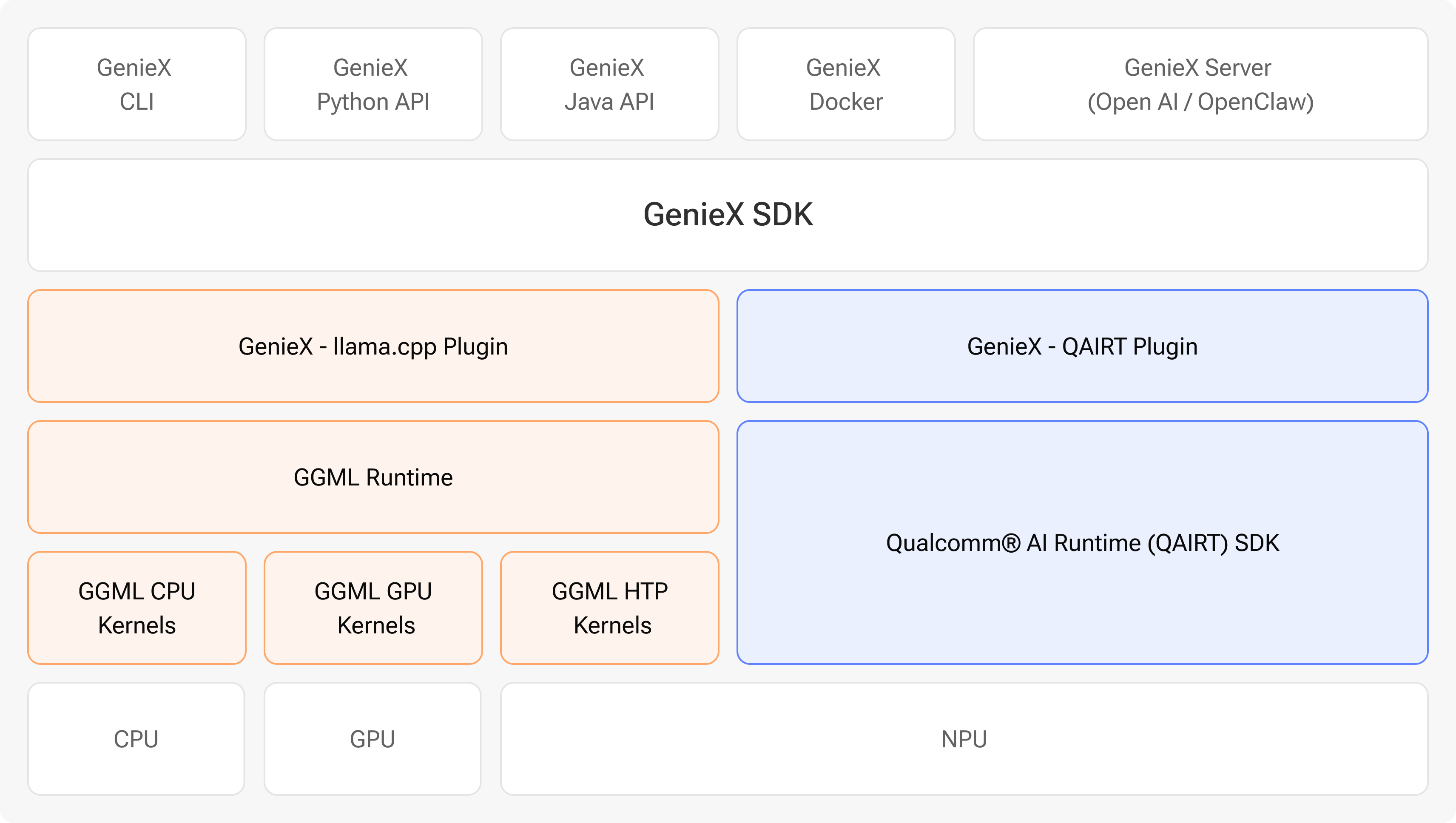 GenieX exposes **five entry points**, all over a single SDK:
* **CLI** — run and serve models straight from the terminal.
* **Python** — embed inference in your apps with the Python SDK.
* **Java/Kotlin** — the Android SDK for on-device mobile apps.
* **Docker** — a containerized image for reproducible deployments.
* **OpenAI-compatible server** — a drop-in local server for existing OpenAI clients.
Under the hood, that SDK dispatches to either the **llama.cpp runtime** (GGML kernels for CPU / GPU / Hexagon HTP) or the **[Qualcomm® AI Engine Direct](https://www.qualcomm.com/developer/software/qualcomm-ai-engine-direct-sdk) runtime** (NPU-only). The same SDK runs on Windows ARM64, Android, and Linux ARM64.
**Qualcomm AI Engine Direct** is the official name of what is also known as the *Qualcomm AI Engine Direct SDK*, *Qualcomm AI Runtime*, and *QAIRT*. Throughout these docs we use the official name.
## **Why two runtimes?**
So you get both **broad model coverage** and **optimal performance** in one stack:
* **Most models just work** — point GenieX at almost any GGUF on Hugging Face and it runs on CPU / GPU / NPU via llama.cpp.
* **Qualcomm® AI Hub Models run optimally** — models published to [Qualcomm AI Hub](https://aihub.qualcomm.com/) are pre-compiled per chipset and run through Qualcomm AI Engine Direct on the Hexagon NPU for peak on-device performance.
See [Platforms & runtimes](/en/get-started/platforms#geniex-runtimes) for when to pick which.
## **What you can do with GenieX**
* **Run models locally** on Snapdragon X (Windows ARM64), Snapdragon 8 Elite (Android), and Dragonwing IoT chipsets.
* **Pick a runtime** — `llama.cpp` for any community GGUF model, Qualcomm AI Engine Direct (`qairt`) for Qualcomm AI Hub pre-compiled NPU bundles.
* **Build apps** through the CLI, an OpenAI-compatible local server, the Python SDK, the Android SDK, or a Docker image.
## **Pick where to start**
Choose your interface and get to first inference in minutes.
Snapdragon platforms GenieX supports, and when to pick llama.cpp vs Qualcomm AI Engine Direct.
Tested LLMs and VLMs across the llama.cpp and Qualcomm AI Engine Direct runtimes.
## **Community**
File a bug, request a feature, or browse open issues on GitHub.
Collaborate with the GenieX team and other developers.
## **Legal**
GenieX is released under the BSD 3-Clause License.
Qualcomm site terms of use.
GenieX exposes **five entry points**, all over a single SDK:
* **CLI** — run and serve models straight from the terminal.
* **Python** — embed inference in your apps with the Python SDK.
* **Java/Kotlin** — the Android SDK for on-device mobile apps.
* **Docker** — a containerized image for reproducible deployments.
* **OpenAI-compatible server** — a drop-in local server for existing OpenAI clients.
Under the hood, that SDK dispatches to either the **llama.cpp runtime** (GGML kernels for CPU / GPU / Hexagon HTP) or the **[Qualcomm® AI Engine Direct](https://www.qualcomm.com/developer/software/qualcomm-ai-engine-direct-sdk) runtime** (NPU-only). The same SDK runs on Windows ARM64, Android, and Linux ARM64.
**Qualcomm AI Engine Direct** is the official name of what is also known as the *Qualcomm AI Engine Direct SDK*, *Qualcomm AI Runtime*, and *QAIRT*. Throughout these docs we use the official name.
## **Why two runtimes?**
So you get both **broad model coverage** and **optimal performance** in one stack:
* **Most models just work** — point GenieX at almost any GGUF on Hugging Face and it runs on CPU / GPU / NPU via llama.cpp.
* **Qualcomm® AI Hub Models run optimally** — models published to [Qualcomm AI Hub](https://aihub.qualcomm.com/) are pre-compiled per chipset and run through Qualcomm AI Engine Direct on the Hexagon NPU for peak on-device performance.
See [Platforms & runtimes](/en/get-started/platforms#geniex-runtimes) for when to pick which.
## **What you can do with GenieX**
* **Run models locally** on Snapdragon X (Windows ARM64), Snapdragon 8 Elite (Android), and Dragonwing IoT chipsets.
* **Pick a runtime** — `llama.cpp` for any community GGUF model, Qualcomm AI Engine Direct (`qairt`) for Qualcomm AI Hub pre-compiled NPU bundles.
* **Build apps** through the CLI, an OpenAI-compatible local server, the Python SDK, the Android SDK, or a Docker image.
## **Pick where to start**
Choose your interface and get to first inference in minutes.
Snapdragon platforms GenieX supports, and when to pick llama.cpp vs Qualcomm AI Engine Direct.
Tested LLMs and VLMs across the llama.cpp and Qualcomm AI Engine Direct runtimes.
## **Community**
File a bug, request a feature, or browse open issues on GitHub.
Collaborate with the GenieX team and other developers.
## **Legal**
GenieX is released under the BSD 3-Clause License.
Qualcomm site terms of use.